Check out our pick of the best chartplotters on the market
Whether you’re looking for an all-out intergrated ‘glass bridge’ system or a robust handheld device, we’ve picked out some of the best chartplotters to make sure you find exactly what you’re looking for.
PC chartplotters
If you’re looking for a budget solution to your plotting problems, you can turn an old laptop into a passage planner and chartplotter for less than £100. You get a lot more for your money with a PC set-up, including extra features and cheaper upgrades.
Garmin HomePort
 Garmin GPS users can now use their home PCs for passage planning, thanks to its new HomePort application. The updated software allows users of Garmin’s Bluechart, G2 and G2 Vision cartography on SD or Micro SD format to display charts on their home PC, and use them for passage planning, marking waypoints and managing routes. The software can be downloaded from Garmin’s website or bought in Garmin outlets on a 2GB SD card. For plotters like the 400 and 500 series where the cartography is built in, you can use a blank SD card to transfer charts back and forth.
£26.99, Garmin
Admiralty RYA plotter
 The Admiralty RYA plotter is the one of the easiest programs to use but that’s mainly down to its minimal functionality. Installation and configuration is a very simple process and as the copy protection is embedded in the CD, no unlocking codes are required. Five folios of raster charts covering the British Isles are loaded individually from the CD, which is a straightforward but fairly boring process and there are no foreign charts available yet. The tidal data expires at the end of each year but the charts do not, but you can add your own chart corrections as on-screen notes.
£49.95, Admiralty Leisure
Imray Digital Charts
 Imray’s Digital Chart is our favourite budget buy for passage planning. It offers the basic functionality at a competitive price, and plenty of chart coverage that will meet the needs of most UK-based boaters. One drawback is that the plotter expires two years after publication, with a new edition coming out every December, and the tidal software needs renewing annually. The only advantage is that chart updates are available from the Imray website at the same time as the paper editions.
£165.99, Imray
SeaPro Lite+
 A great multi-purpose tool for sea use and planning, Sea Pro Lite+ works with Euronav’s Livechart, Navionics charts and many other formats. Installation is easy as it comes on a dongle, which is plugged into the computer’s USB socket and you don’t need any unlock codes. Zooming and panning vector and raster charts are seamless in Lite+ and there’s also a tool that lets you draw corrections and notes onto the chart.
£245, Euronav
Neptune C-Map Planner PLUS
 The Neptune C-Map Planner PLUS uses UKHO raster charts covering the UK in 10 folios (one is included with the software, the remaining nine are available to buy for £29 each). Installation and configuration is easy and uses a software unlock code system. Neptune’s route calculations are very powerful and it can also work as a basic chartplotter. The overview window is a nice touch too, showing a thumbnail of the whole chart and a box indicating the area you are zoomed in to. It falls down in the user interface, though: it’s quite basic, and results are displayed in large reams of text.
£34.95, Neptune Navigation
Digiboat Software-On-Board
 SOB, as it is known, is an advanced system with all kinds of features. Although it’s the most expensive system listed here it represents good value for money due to some additional features like wind data and a GRIB weather overlay. The software uses C-Map NT+ and Max charts, either on CD or cartridge. You can also transfer routes and waypoints between the PC and plotter. In route planning, you can specify either the speed of the boat, or the required ETA, either leg-by-leg or for the whole route. On the downside tidal streams cannot be used in the route calculations. And because SOB doesn’t use Microsoft Windows there are no menus – only a toolbar, which can take some getting used to.
£291, Digiboat
Navionics app for Apple iPhone
 Probably the cheapest chartplotting solution around, this app does everything from the usual tracking, route planning and tide, current and waypoint marking, to more sophisticated things like geo-tagging pictures, marking routes on Facebook and recommending nearby repair yards and restaurants. But with its limited battery and aversion to water you’ll need to keep your handset near a power source and well away from the wet stuff.
From £14.99, Apple
Plan2Nav app
 Jeppersen is one of the major players in vector cartography, so we were expecting good things from its Plan2Nav app, which uses the company’s well-established C-Map 4D charts. It was disappointing, therefore, to find the interface old-fashioned, clunky and a bit slow. One positive is that the basic app is free, giving you a worldwide background chart on which you can do basic route planning and see what the weather is doing up to five days ahead. You can also get speed over ground, course over ground and time to go info. Paying £26.99 gives you full detail, such as nav aids, harbour charts, dynamic tides and currents and handy photos of ports. All charts stay on your device for use when outside Wi-Fi or 3G range. Overall though, we found it short on functions and difficult to use.
From £26.99, Apple and Google Play
iNavX Marine Navigation app
 The ability of this app to read both raster scanned and vector charts makes it a versatile option. This plotter also scores well in the USA where the NOAA charts are raster scans and a popular form of digital navigation. Unlike many apps, this one will read a number of different chart formats as well as provide the ability to overlay GRIB weather files. If you’re looking for an app that you can integrate and expand in time, this is a good choice, especially as the format allows you to tailor the information displayed. But in Europe (and for our test), the system uses Navionics charts, which need to be downloaded from x-traverse.com at a cost. This was not as straightforward a process as with other apps, where you can simply tap a button and download a chart. On test, we struggled to warm to the iNavX system. As well as the one-off price of the app, European boaters will have to then spend more on Navionics charts for local waters. If you’re going to use Navionics charts, the Navionics app is cheaper, easier and clearer. For a standalone iPad chartplotter, there are cheaper, simpler and more intuitive systems available.
From £39.99, Apple
Transas iSailor app
 iSailor has clear, easily viewed charts with optional boxes to display lat and long, course, distance, XTE and ETA, without having to change the whole display. It has other neat tricks, such as being able to export/import route data, making passage planning ashore easy, and for £6.99 you can unlock extra features such as an AIS transponder input via TCP. The charts are expensive if you need a large area: £11.99 per folio in the UK, with 18 folios covering the whole country. But if your boating is concentrated in one area the pricing of these charts might be better value than having to pay for access to charts for the whole country or region. They are, incidentally, simple and quick to download on a mobile signal and seamlessly paid for through the app itself.
From £11.99, Apple
Handheld plotters
If you’re looking for a handheld GPS that’s reliable, versatile and packed full of features, then you might want to consider one of these three…
Geonav 4C XS
 Featuring a generously sized screen – 3.5ins corner to corner, which is the same proportions as the Apple iPhone screen – the Geonav 4C XS is big enough to be used in anger and offers a range of useful functions including tide and currents data, chart rotation and autozoom. As if to defeat the point, it comes with a 12-pin connector which allows the display of Navionics charts on any SVGA standard monitor. It can also be used on dry land with the specially designed Navionics Gold Land&Sea charts.
£529.99, Geonav
Garmin 76Cx
 A high-sensitivity GPS receiver finds satellite signals quickly and can track your location in even the most challenging of conditions, while the turn-by-turn routing feature will keep you on course easily. It also comes with a removable microSD card capable of storing up to 128 megabytes of maps or any other data, which can be upgraded to a higher capacity if you find yourself running out of space. The card slot is conveniently located inside the waterproof battery compartment, and don’t worry if you drop it in your drink – the 76Cx is so water tight it floats.
£289.99, Garmin
Magellan Triton 2000
 Whether on land or at sea, the Magellan Triton 2000 is designed for the great outdoors. The usual GPS, electronic compass and barometer all feature, but SD-cards pre-loaded with marine charts are also included, adding a range of nautical maps displaying tide and depth information for different parts of the world. The 2.7in colour touchscreen comes with a fiddly stylus, but it’s easier to use a finger or the sturdy buttons. Although it comes wrapped in rubber casing, the Triton is not strictly waterproof and anything longer than 30 minutes or deeper than a metre will do very bad things to it.
£399.99, Magellan
Stand-alone plotters
For a stand-alone device you will need a sunlight viewable colour screen, with simple-to-use menus and – of course – some decently drawn maps. Here’s our pick of the best…
GPSmap 400 or 500 Series
 The Garmin name is synonymous with GPS so you won’t go far wrong with a plotter or combined plotter/fish finder from either the GPSmap 400 or 500 Series. Try the GPSMAP 556 which comes with preloaded marine charts for the UK and Ireland.
From £600, Garmin
Raymarine A-Series
 The new Raymarine A-Series has all the intuitive functions of the E-Series along with Navionic’s cartography and high-resolution screens in three sizes – 5in, 5.7in and 6.4in. Any model with a D suffix also utilise HD digital fishfinding technology.
From £700, Raymarine
Lowrance HDS
 Lowrance HDS is a new range of plotters and fishfinders from marine electronics developer Navico. Available in eight models with screens from 5in to 10in, the fishfinder versions use the exclusive broadband sounder technology, which matches exceptionally low power with efficient long pulses for even greater sonar sensitivity.
From £600, Lowrance
AdvanSea
 AdvanSea is the new name for the Navman brand and offers a range of products made by Navimo. Three versions will be available, one of which is a combination plotter/fishfinder that will be launched at next year’s London Boat Show. Interesting features include a snapshot function to allow JPEG images to be saved from the screen to an SD card, and a quick-release mounting bracket
Navimo
Standard Horizon CP180i
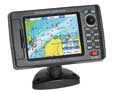 Compatible with C-MAP NT+ and MAX charts, the Standard Horizon CP180i is water resistant and the LCD colour display copes well with direct sunlight. It also comes with dedicated mark and route keys that allows for routing right on the chart page and the creation of a single waypoint. An optional fishfinder is available and considering the price it is hard to beat this little plotter.
From £300, Standard Horizon
Integrated systems
If money is no stumbling block and you want the most up-to-date kit available, then an integrated system will be the thing for you. These clever devices incorporate a GPS chartplotter, radar and depth instrument within all in one place. All these systems are displayed on a single screen, although you can opt for numerous others to create what is known as a ‘glass bridge’.
Raymarine E-Series and C-Series Widescreen
 Raymarine’s new Widescreen versions of the basic C-Series and its more sophisticated E-Series have the benefit of easier-to-read screens and digital radar compatibility. Furthermore, the Widescreen units can be doubled up whereas the ordinary C-Series models are only single-station units. Both series offer plotter, fishfinder, radar, video, instrument and engine data and the E-Series includes an excellent on-screen ‘qwerty’ keypad for naming waypoints.
Screen size options: 9in, 12in and 14in
Prices vary, Raymarine
Furuno NavNet 3D
 The Furuno NavNet 3D combines a plotter, fishfinder, radar, video, instrument and engine data into a multi-station system. This latest model uses high-resolution satellite photography to overlay the charts and keeps the controls simple and functional. To keep redraw times to a minimum and create a seamless perusal of the chart, Furuno uses TimeZero technology. This allows the operator to scale up or down in an infinite number of steps rather than being stuck on set ranges.
Screen size options: 8.4in and 12.1in multifunction displays or 15in and 17in displays with a black box processor
Prices vary, NavNet
Simrad Glass Bridge System
 This flexible package allows you to create a tailor-made navigation solution whatever your requirements. In addition to radar, weather data and an echosounder, the more recent GB65 model lets you use up to 12 screens for vector charts, photos, radars, navigation information, raster charts, 3D and video inputs.
Screen size options: 12in, 15in or 19in
From £6500, Navico
Raymarine G-Series
 Raymarine’s G-Series offers the very latest in electronic navigation, including digital radar and wireless remote keyboards. The system provides a central display for navigational data, instrument information, video and on-board cameras, radar, fishfinders and cartography. It comes pre-loaded with worldwide maps from Navionics, showing navigation charts, 3D topography, aerial photographic views of ports, port data and animated tides and currents.
Screen size options: 12in, 15in, 17in and 19in
From £3000, Raymarine
Simrad’s NSE
 Simrad’s new NSE units have a professional, robust feel to them, and as Simrad is part of the Navico group they can utilise Navico’s super-clear Broadband radar technology. The system combines a plotter, fishfinder, radar, video, instrument and engine data. The NSE range has high processor speeds and the redraw time is barely noticeable, so you are continually finding new angles from which to view your progress.
Screen size options: 8in and 12in
Prices vary, Simrad
Garmin 6000 and 7000 Series
 Garmin has upped the ante in the battle of the big electronics companies with the launch of two new ranges. It has taken its current 4000 and 5000 series of plotters and given them dual processors to incorporate Garmin’s G Motion technology, which offers vast improvements in speed, smoothness and clarity when panning and zooming. With blazing-fast map redraw and refresh rates, you’ll have near real-time data to guide you, while both systems allow the addition of sonar, radar and weather features. This is as sophisticated as it gets.
Screen size options: 8in and 12in (6000 series) and 12in and 15in (7000 series)
From £2500, Garmin